Baking
Baking samples evaluated FBG animation over the current scene frame range and writes it into standard Blender animation data.
For the underlying runtime model, see How FBG Works and Animation.
FBG provides two bake operators:
Bake for Renderwrites animation directly onto blockout mesh objects.Bake to Rigcreates a standard Blender armature and writes animation onto an Action on that armature.
Both paths sample the same finalized figure animation you see during playback.
Shared bake behavior
- Both operators act on finalized blockouts with
Animation Playbackenabled. - If multiple finalized blockouts meet that condition, all are included in the same bake run.
- The bake range comes from the current scene frame range:
StarttoEndin the Timeline. - Baking samples the evaluated FBG result for each frame.
- Source controller animation remains intact; baking writes additional output data.
Bake for Render
Bake for Render bakes object transforms directly as keyframes onto the generated blockout mesh objects. The result plays back through Blender's standard object animation system.
It produces:
- one Action per object
- object
locationandrotation_quaternionkeyframes
This operator does not bake mesh deformation. If Deform Updates is enabled on a target blockout, the bake is cancelled.
Bake to Rig
Bake to Rig creates a new Blender armature for the finalized blockout and bakes the evaluated animation into an Action on that armature.
The armature is generated from the blockout's proportions at bake time -- bone positions come from the figure's anatomical anchors, so the rig fits the body shape you have configured. It is not a pre-existing hidden object being revealed; it is created fresh each time you bake.
It produces:
- one armature object per blockout, built from its current proportions
- one Action on that armature with pose-bone keyframes sampled from the evaluated result
The result is a standard Blender armature that can be used in normal armature workflows, including binding and Action reuse.
The rig includes deformation helper bones for better mesh deformation out of the box.
It is not an animator-control rig. The bake produces bones and keyframes, but no custom controllers or constraint mechanisms for authoring new motion.
For re-baking behavior and scene cleanup, see Rebaking.
Rest Pose Source (Bake Popup)
Bake to Rig lets you choose how the generated rig's rest pose is built.
Defaultbuilds the rig in the figure's default rest pose.Combo Presetbuilds the rig's rest pose from a saved Pose Combos preset.
In Combo Preset mode, Use Preset controls the source of the root transform (position, rotation, and pivot offset) at bake time.
Use PresetOFF: taken from the current figure at the start frame.Use PresetON: taken from the selected combo preset.
If the preset does not drive root transform channels, FBG falls back to the current figure root transform.
Rest Pose Source affects the generated rig's rest pose only. The baked motion is still sampled from the evaluated animated figure, and the rig proportions still come from the current figure at bake time.
When Combo Preset is used, preset-level pose-mode flags that affect rest-pose construction are also restored for that rest pose. This includes options such as FK/IK modes or Auto Stance Height. Per-combo Stored Options still behave separately and only apply when those combos are enabled.
Action reuse
If you want to reuse Actions between multiple baked rigs, keep the same rest-pose setup. Different rest poses can cause visible mismatches when reusing the same Action.
Bone reference
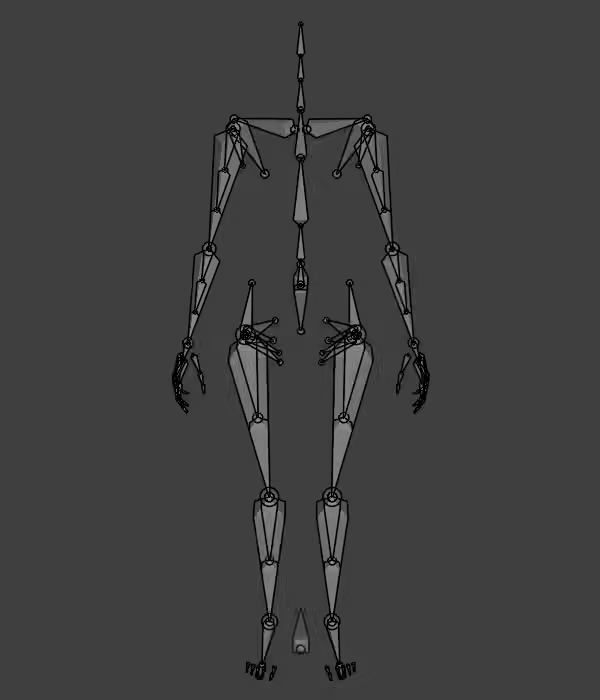
The full skeleton uses Blender-standard .L / .R naming:
| Region | Bones |
|---|---|
| Core | root, cog, pelvis |
| Spine | spine, spine.001, spine.002, spine.003 |
| Neck and head | neck, neck.001, head |
| Shoulder girdle | clavicle, scapula |
| Arm | upper_arm, forearm |
| Hand and fingers | hand, palm.01-04, thumb.01-03, index.01-03, middle.01-03, ring.01-03, pinky.01-03 |
| Leg | thigh, shin |
| Feet and toes | foot, toes (fallback), hallux.01-02, toe2.01-03, toe3.01-03, toe4.01-03, toe5.01-03 |
| Twist helpers | upper_arm_twist.01-03, forearm_twist.01-03, thigh_twist.01-02, shin_twist.01-02 |
| Pelvis helpers | hip, glute, glute_lower, inguinal, pectineus |
| Shoulder helper | armpit |
Advanced Tuning (Bake Popup)
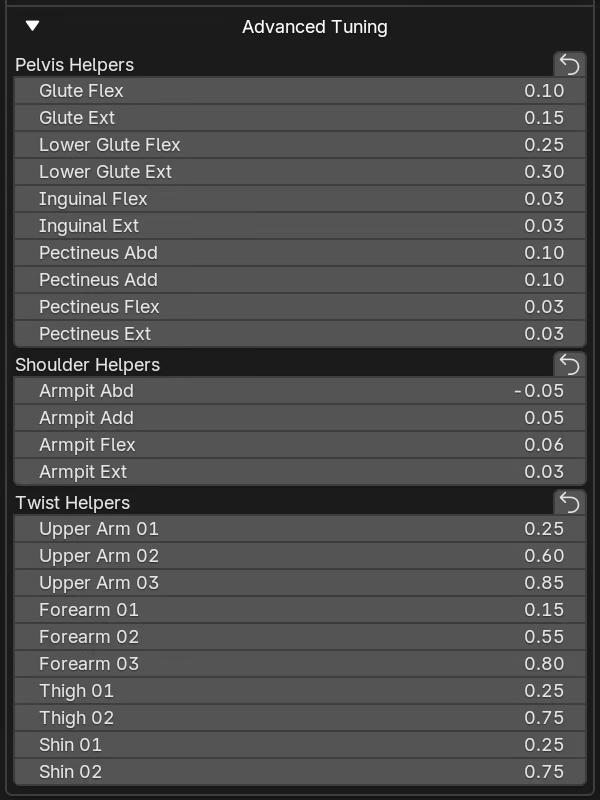
The baked rig includes additional helper bones beyond the main limb chains. These bones improve deformation in areas where a single rigid chain is not enough -- the pelvis, shoulder, and limb twist regions. The Advanced Tuning popup lets you configure how they are baked.
Twist helpers
Twist helpers distribute axial rotation along a limb segment. Without them, all twist concentrates at the joint and the mesh pinches and collapses ("candy wrapper" deformation).
How they work: each twist bone is parented to the main limb bone but only carries a fraction of its axial twist. The fractions increase from proximal (near the joint) to distal (toward the extremity), creating a smooth gradient.
| Chain | Segments | Distribution |
|---|---|---|
| Upper arm | upper_arm_twist.01-03 |
25% / 60% / 85% |
| Forearm | forearm_twist.01-03 |
15% / 55% / 80% |
| Thigh | thigh_twist.01-02 |
25% / 75% |
| Shin | shin_twist.01-02 |
25% / 75% |
Rest-pose behavior with Combo Presets:
- Twist helpers are evaluated as delta from the selected rig rest pose.
- If your rest preset already contains twist-driving values (for example foot yaw or forearm pronation), helpers do not stay permanently pre-twisted in rest.
Pelvis helpers
The pelvis area is one of the hardest regions to deform well. A single pelvis bone cannot handle the complex volume changes that happen during leg movement -- squatting, sitting, spreading legs, walking. The rig uses a fan bone system centered on each hip socket to maintain volume across these motions.
Five helpers per side, all parented to the pelvis and originating at the hip socket:
- Role: Stable skin anchor for the upper-lateral pelvis region.
- Follows: Static -- does not follow thigh motion.
- Role: Posterior glute support.
- Follows: Thigh 10% flexion, 15% extension.
- Role: Lower-glute to upper-thigh bridge.
- Follows: Thigh 25% flexion, 30% extension.
- Role: Front hip crease support.
- Follows: Thigh 3% flexion, 3% extension.
- Role: Inner-thigh and groin support.
- Follows: Thigh 10% abduction, 10% adduction, 3% flexion, 3% extension.
Shoulder helper
One armpit helper bone per side, parented to clavicle and positioned from the glenoid toward the axillary fold.
- Role: Supports the armpit area in raised-arm poses.
- Follows: Upper arm abduction -5%, adduction 5%, flexion 6%, extension 3%.
Deform bones
By default, these bones are set to non-deform:
root,cog-- control bones, not meant for skinningupper_arm,forearm-- replaced by their twist helper chains for deformationthigh,shin-- replaced by their twist helper chains for deformationtoes-- single-bone toe fallback (see Toes below)
Twist helpers, pelvis helpers, shoulder helpers, and per-toe chains are deform-enabled by default. Any bone's deform flag can be changed manually after baking.
Toes
Two levels of toe detail, both with baked motion:
- Per-toe chains (
hallux,toe2throughtoe5) -- deform-enabled chains for full toe deformation. - Single fallback bones (
toes.L/toes.R) -- one bone per side, non-deform by default. Enable deform on these for a simpler setup (shoes, low-poly characters).
Scale compensation
FBG keys scale channels on shin and forearm bones per frame to keep chain alignment stable.
Shin scale compensates for effective knee-to-ankle distance changes caused by Knee Hyperextension, Knee Valgus.
Forearm scale compensates for effective elbow-to-wrist distance changes caused by Elbow Valgus, most visible when Hand Pin is active.
These are normal bake-fidelity mechanisms, not rare corrections.
Animated scale in downstream workflows
If you plan to export or retarget, check whether your destination workflow supports animated bone scale.
Re-baking
Baking is intended for iteration: bake, adjust the source animation, and rebake as needed. Each rebake replaces the previous result; it is not an in-place update.
FBG marks the data it creates (baked rigs and bake-created Actions), so automatic cleanup only targets those marked bake outputs.
Bake to Rig
Rebaking removes the previous baked rig from the blockout collection, then generates a fresh rig and Action from the current evaluated animation.
- Old Actions are auto-removed only when they are FBG-managed, have no Fake User, and have zero users.
To keep the full previous bake result, move the baked rig out of the blockout collection before rebaking -- this preserves both the rig and its Action.
To keep only the Action, before rebaking do one of the following:
- Assign a Fake User (
F) to the Action. - Unlink the Action from the rig -- cleanup only checks the Action assigned to the rig at removal time.
- Share the Action with another user -- cleanup skips Actions that still have users after unlinking.
Bake for Render
Rebaking unlinks the previous render-bake Actions from the generated mesh objects, then writes new Actions from the current evaluated animation.
- Old Actions are auto-removed only when they are FBG-managed, have no Fake User, and have zero users.
- If you regenerate or delete a blockout, its generated objects are removed; FBG-managed bake Actions linked only to those objects are then cleaned by the same rule.
These cleanup rules apply when using FBG bake, regenerate, and delete operators.